Azure News - 2026-09-12
2026-09-12
最終更新: 2026-09-13 06:44:46 JST
AI による概要
この日は 3 件で、コネクタの新しいトリガー先、ファイル移行、ディストリビューションの廃止案内でした。Azure Managed Connectors (パブリックプレビュー) は、トリガー先として Azure App Service を選べるようになりました。ASP.NET Core・Java・Node.js・Python で動くアプリへ、コネクタのイベントを直接配信できます。これは Managed Connectors のプレビューに加わった新機能であり、App Service 自体の新しいプレビューを発表するものではありません。ファイル移行では、Azure Storage Mover がオンプレミスの SMB ファイル共有を Azure Files (SMB) へ移行するエージェントレス移行をパブリックプレビューでサポートし、移行エージェントをデプロイ・登録・保守することなく、Windows Server や NAS の共有からデータを Azure へ移せるようになりました。一方、Azure Kubernetes Service の Azure Linux with OS Guard は 2026 年 12 月 10 日にサポートを終了することが発表され、後継の Azure Container Linux (プレビュー) への移行が案内されています。同日以降は Azure Linux with OS Guard の新規作成ができなくなります。
主要トピック
連携: Azure Managed Connectors のトリガー先に Azure App Service を追加 (ASP.NET Core・Java・Node.js・Python 対応)
ストレージ移行: Azure Storage Mover がオンプレ SMB 共有から Azure Files へのエージェントレス移行をプレビュー提供
廃止: AKS の Azure Linux with OS Guard が 2026-12-10 にサポート終了、後継は Azure Container Linux (プレビュー)
Azure Updates
[In preview] Public Preview: Agentless migration of on-premises SMB file shares to Azure Files (SMB)
- Link: https://azure.microsoft.com/updates?id=570910
- Published: 2026-09-12 00:58:56
- Fetched: 2026-09-12 03:48:07
Retirement: Azure Linux with OS Guard in Azure Kubernetes Service
- Link: https://azure.microsoft.com/updates?id=571257
- Published: 2026-09-12 03:08:28
- Fetched: 2026-09-12 03:48:07
Apps on Azure Blog
Azure App Service is now a trigger destination for Azure Managed Connectors
- Link: https://techcommunity.microsoft.com/t5/apps-on-azure-blog/azure-app-service-is-now-a-trigger-destination-for-azure-managed/ba-p/4555785
- Published: 2026-09-12 03:41:02
- Fetched: 2026-09-13 06:44:46
詳細を表示
Azure Managed Connectors, currently in public preview, now lets you choose Azure App Service as a trigger destination. Connector events can be delivered directly to applications running on App Service, including ASP.NET Core, Java, Node.js, and Python applications.
This is a new capability in the Managed Connectors public preview. It is not the announcement of a separate App Service preview.
What's new
When you create a trigger in the Managed Connectors portal, App Service now appears as a first-class destination alongside Azure Functions and the generic HTTP endpoint option.
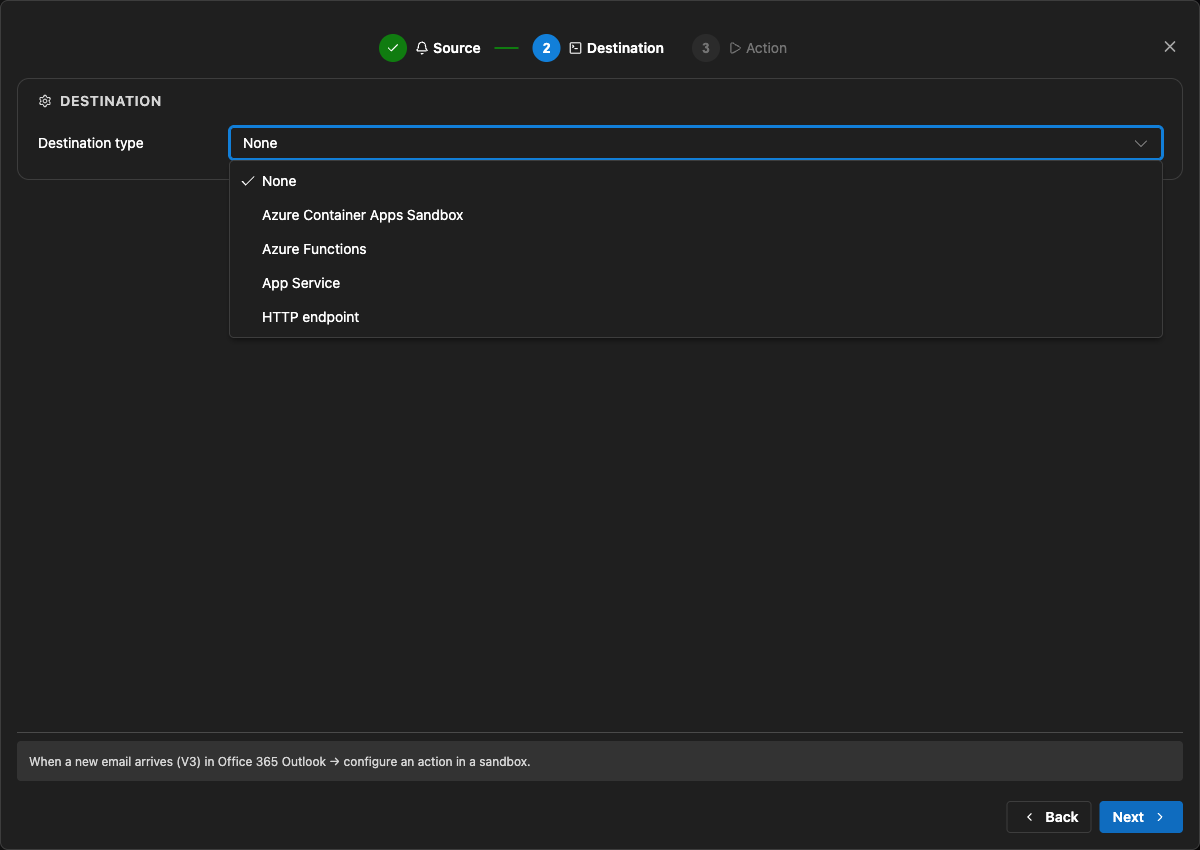
After selecting an existing App Service app, you configure:
- The application route that receives the event. New triggers default to
POST /api/webhook, and the route can be edited. - The Connector Namespace managed identity used to authenticate the callback.
- The Microsoft Entra audience expected by the receiving application.
Managed Connectors then records the selected App Service resource, route, managed identity, and audience as part of the trigger configuration. You no longer need to select the generic HTTP destination and manually assemble the App Service callback URL.
What are managed connectors?
Managed connectors provide a consistent way for applications to integrate with services such as Office 365, SharePoint, Teams, Dataverse, and Salesforce. A Connector Namespace manages connections and connector operations so developers do not need to build a separate OAuth flow and service-specific client for every integration.
Managed connectors support both directions:
- Triggers deliver events to your application, such as a new Outlook email or a file added to SharePoint.
- Actions let your application call operations such as posting a Teams message, flagging an email, or creating a list item.
The App Service destination makes the trigger side a first-class option for existing web applications and APIs.
How it works
- In the Managed Connectors portal, create a trigger and select App Service as its destination.
- Select the web app, callback route, Connector Namespace managed identity, and Microsoft Entra audience.
- When the source event occurs, Managed Connectors requests a token using the selected managed identity and sends the event to the App Service route.
- App Service built-in authentication validates the token before the request reaches application code.
- The application processes the event and can use Managed Connectors actions to continue the workflow.
The callback is an ordinary authenticated HTTP request, so the application can use its normal framework, routing, dependency injection, logging, monitoring, and deployment practices.
Configure receiving-app authentication
The App Service destination configures the Managed Connectors side of the callback. The receiving application must still be configured to trust it.
The reference sample uses App Service built-in authentication, also known as Easy Auth, with:
- A Microsoft Entra application that identifies the receiving application and its audience.
- A secretless federated credential configuration.
- The Connector Namespace managed identity pinned as an allowed principal.
- Authentication required for requests reaching the application.
This configuration rejects unauthenticated requests and allows callbacks carrying the expected managed-identity token. The Managed Connectors trigger wizard does not currently create or update the App Service authentication configuration automatically.
Try the end-to-end sample
The Managed Connectors on Azure App Service email-triage sample demonstrates a complete workflow:
- An Office 365 Outlook trigger delivers a new email to an ASP.NET Core application on App Service.
- App Service built-in authentication validates the managed-identity callback.
- The application classifies the message and enriches the sender through the Office 365 Users connector.
- Important mail produces a Microsoft Teams triage card.
- The application flags the source email in Outlook.
The repository includes the application, Bicep infrastructure, App Service authentication configuration, Connector Namespace connections, and an Azure Developer CLI deployment flow.
We validated the complete workflow end to end: the authenticated callback reached POST /api/webhook, the application processed the event, a Teams card was posted, and the source Outlook message was flagged.
Current limitations
- The capability is configured through the Managed Connectors portal, not the App Service portal.
- The wizard configures the Managed Connectors trigger but does not configure App Service built-in authentication on the selected web app.
- The current sample authentication setup requires a Microsoft Entra application, audience configuration, federated credential, and allowed-principal configuration.
- Depending on the application's Easy Auth configuration, authentication can apply to the whole application rather than only the connector callback route.
- The reference sample validates one push-trigger scenario; it is not a compatibility statement for every connector and operation.
What's next
The first-class App Service destination removes the generic callback URL step and provides an App Service-aware trigger experience in Azure Managed Connectors.
We are also exploring ways to simplify receiving-side authentication so applications can establish connector-scoped trust without manually assembling the App Service authentication configuration.
Try the reference sample and share feedback on the connectors and App Service scenarios you want to use.