Azure News - 2026-07-16
2026-07-16
最終更新: 2026-08-27 21:13:50 JST
AI による概要
この日は Microsoft Agent Framework 関連の発表が集中しました。C# と Python 向けのマルチエージェントオーケストレーション SDK として Agent Framework が導入され、AutoGen と Semantic Kernel に分散していたパターンが統合されています。本番ランタイムである Agent Harness と、動的な Magentic を含むマルチエージェントオーケストレーションパターンがいずれも一般提供となりました (Magentic は GAIA で 38% を記録)。プレビューでは、エージェントの実行をモデル呼び出し・ツール実行・中間結果のツリーとして可視化する DevUI Agent Inspector、成功したタスクパターンを記憶して再利用するエピソード的手続き記憶、複数ステップの計画を単一の実行可能コードブロックにまとめる CodeAct パターンと Hyperlight コンテナ、Python / .NET 向けのトレーシングが追加されています。
主要トピック
エージェント基盤: C# / Python 向けマルチエージェントオーケストレーション SDK として Agent Framework を導入 (AutoGen と Semantic Kernel を統合)
本番運用: Agent Harness と Magentic を含むオーケストレーションパターンが GA (Magentic は GAIA で 38%)
デバッグ: DevUI Agent Inspector でエージェント実行をモデル呼び出し・ツール実行のツリーとして可視化 (プレビュー)
記憶: エピソード的手続き記憶で成功したタスクパターンを記憶し再利用 (プレビュー)
実行効率: CodeAct パターンと Hyperlight コンテナで複数ステップの計画を単一コードブロックに集約 (プレビュー)
認可: MCP のエンタープライズ認可を Entra と App Service で実現する方法を解説
Azure Updates
Announcing: DevUI Agent Inspector for Microsoft Agent Framework
- Link: https://azure.microsoft.com/updates?id=563551
- Published: 2026-07-16 00:15:25
- Fetched: 2026-08-27 21:13:48
[In preview] Public Preview: Advanced platform metrics in Azure Monitor
- Link: https://azure.microsoft.com/updates?id=567726
- Published: 2026-07-16 00:30:11
- Fetched: 2026-08-27 21:13:48
[Launched] Generally Available: Expanding Azure Arc SQL Migration with SQL Server on Azure Virtual Machines
- Link: https://azure.microsoft.com/updates?id=567362
- Published: 2026-07-16 02:35:31
- Fetched: 2026-08-27 21:13:48
[In preview] Public Preview: Azure SQL updates for mid-July 2026
- Link: https://azure.microsoft.com/updates?id=567426
- Published: 2026-07-16 02:50:44
- Fetched: 2026-08-27 21:13:48
Announcing: Episodic procedural memory in Microsoft Agent Framework
- Link: https://azure.microsoft.com/updates?id=563561
- Published: 2026-07-16 03:48:54
- Fetched: 2026-08-27 21:13:48
Announcing: CodeAct pattern and Hyperlight containers in Microsoft Agent Framework
- Link: https://azure.microsoft.com/updates?id=563566
- Published: 2026-07-16 03:50:14
- Fetched: 2026-08-27 21:13:48
Announcing: Tracing for Microsoft Agent Framework (Python and .NET)
- Link: https://azure.microsoft.com/updates?id=564071
- Published: 2026-07-16 03:51:45
- Fetched: 2026-08-27 21:13:48
Announcing: Multi-agent orchestration SDK with the Microsoft Foundry Agent Framework in C# and Python
- Link: https://azure.microsoft.com/updates?id=564312
- Published: 2026-07-16 03:53:28
- Fetched: 2026-08-27 21:13:48
Announcing: Agent Harness in Microsoft Agent Framework
- Link: https://azure.microsoft.com/updates?id=563546
- Published: 2026-07-16 03:55:40
- Fetched: 2026-08-27 21:13:48
Announcing: Multi-agent orchestration patterns including Magentic in Microsoft Agent Framework
- Link: https://azure.microsoft.com/updates?id=563571
- Published: 2026-07-16 03:57:24
- Fetched: 2026-08-27 21:13:48
Azure Blog
Azure Databricks delivers proven business value
- Link: https://azure.microsoft.com/en-us/blog/azure-databricks-delivers-proven-business-value/
- Published: 2026-07-16 00:00:00
- Fetched: 2026-08-27 21:13:48
Microsoft Azure Databricks delivers the first-party advantage of Databricks on Microsoft—and for customers, that advantage shows up as real, measurable value. It is the same Databricks platform your teams already know, co-engineered with Microsoft and delivered as a native Azure service, so it fits naturally into the Microsoft tools, identity, and governance your organization already runs.
The post Azure Databricks delivers proven business value appeared first on Microsoft Azure Blog.
Azure Architecture Blog
From Policy to Proof: Governing AI to Scale Human Ambition and Machine Intelligence
- Link: https://techcommunity.microsoft.com/t5/azure-architecture-blog/from-policy-to-proof-governing-ai-to-scale-human-ambition-and/ba-p/4535137
- Published: 2026-07-16 04:51:51
- Fetched: 2026-08-27 21:13:49
詳細を表示
Enterprises are moving from AI experiments to AI in production. Copilots are in the flow of daily work, custom applications are built on foundation models, and autonomous agents are beginning to take actions on behalf of the business. As organizations combine human ambition with machine intelligence, trust becomes the defining requirement for scaling AI responsibly and realizing AI's full potential.
That shift changes the governance question from "can we use AI responsibly?" to a harder one: "can we prove, continuously, that every AI system and agent in our estate is safe, compliant, observable, and accountable?"
The organizations getting this right have stopped treating governance as a static document that lives in a policy binder. They treat it as an operating system: a connected set of policies, controls, telemetry, and evidence that runs alongside AI everywhere it operates. Governance defines what should happen. Observability and evaluations verify what is actually happening. Audit and response prove it, and feed what they learn back into policy. The loop, not any single control, is what makes governance real.
Every control in this map ladders up to a principled foundation: Microsoft's Responsible AI Standard, whose six principles (fairness, reliability and safety, privacy and security, inclusiveness, transparency, and accountability) set the bar these controls exist to meet.
This post lays out a practical reference map for that operating system: the domains AI governance must cover, the cross-cutting runtime enforcement layer that operationalizes them, and the Microsoft services that support each one.
The four pillars of AI governance
At its core, AI governance does four things. Skip any one of them and a gap opens up -policy without control is aspirational, control without visibility is blind, and visibility without proof cannot withstand an audit.
- Policy - Define the rules, and who owns them. What's acceptable use, which use cases are approved, how each is classified by risk, and -critically -who is accountable for outcomes at each stage.
- Control - Enforce the boundaries, proportionate to risk. Turn policy into guardrails, access decisions, and lifecycle gates that constrain systems at runtime -with tighter controls on higher-risk use cases.
- Visibility - Observe behavior, including fairness and quality. Capture logs, metrics, traces, token consumption, tool calls, and runtime signals that reveal what AI is truly doing -not just latency and cost, but grounding, drift, and fairness signals.
- Proof - Audit, prove, and improve. Produce the evidence to demonstrate compliance and transparency (explainability and traceability you can show regulators and customers), investigate incidents, and feed what you learn back into policy.
What AI governance covers: the domain map
A complete AI governance program spans nine core domains, with runtime enforcement operating as a cross-cutting layer across several of them. Use this taxonomy to map your own requirements to concrete controls:
- Policy: Responsible AI policies, approval workflows, and guardrails.
- Data governance: Classification, sensitivity labels, DLP, retention, and lineage.
- Model governance: Validation, versioning, documentation, and change control.
- Observability: Logs, metrics, traces, token usage, and runtime signals.
- Evaluations: Quality, safety, grounding, drift, and agent task success.
- Security: Threat detection, posture management, proactive AI red teaming, and prompt-injection resistance.
- Identity & access: RBAC, least privilege, conditional access, and agent identities.
- Audit & compliance: Evidence, eDiscovery, legal hold, and reporting.
- Agent governance: Registry, lifecycle, policy enforcement, and fleet visibility.
Cross-cutting runtime enforcement: Runtime enforcement is not a separate governance program. It is the control layer that operationalizes policy, security, identity, data protection, observability, and agent governance while AI systems are running. It governs live interactions between users, agents, models, tools, APIs, MCP servers, A2A agent APIs, and enterprise systems through authentication, authorization, traffic controls, token governance, quotas, policy checks, and operational guardrails.
The Microsoft governance stack
Microsoft's approach is a composed platform rather than a single product — AI lifecycle, data governance, identity, security, observability, and audit working together:
1. Policy and the control plane: define and enforce
Governance starts with a place to define the rules and decide who owns them. This is where responsible AI and acceptable use policies are authored; where new use cases come in through intake, get classified by risk, and are approved or rejected; where you decide up front which decisions and agent actions require human sign-off versus running autonomously within guardrails; and where accountability is assigned across the deploy, update, and retire lifecycle. Enforcing those rules through runtime guardrails, security posture, agent-level controls, and API-level controls is the job of the sections that follow; the work here is defining what “acceptable” means before anything is switched on.
Services that support it:
- Microsoft Foundry -Compliance workspace for authoring and housing responsible AI policies and use case approvals.
- Azure Policy -Resource level governance to codify those rules as enforceable baselines.
- Azure API Management (AI Gateway): Runtime enforcement for AI applications, models, agents, tools, and APIs, including authentication, authorization, token governance, quota management, and policy enforcement.
(Agent specific policy and lifecycle controls via Microsoft Agent 365 are covered in Section 6.)
Practical takeaway: establish a governance baseline before AI and agent adoption scales -including deciding up front where a human stays in the loop. Retrofitting controls onto a sprawling estate is far harder than starting from one.
2. Data governance and compliance: Purview at the center
Most AI risk is ultimately data risk: the wrong information reaching a model, leaving through a response, or being retained without a policy. Microsoft Purview is the primary governance engine for AI interactions and enterprise data controls, and it works in three moves:
- Discover - Identify AI usage, sensitive prompts and responses, and overall risk posture with DSPM for AI.
- Protect - Apply sensitivity labels, DLP, access boundaries, and retention policies.
- Prove - Generate audit trails, eDiscovery evidence, and compliance reporting.
If the question is “how do we govern the data flowing through AI?” - Purview is the anchor.
3. Model governance, safety, and evaluations: quality at build time and runtime
Evaluations are what make governance measurable, and they belong at two points in the lifecycle:
- Pre-deployment - Release gating on safety, grounding, quality, fairness, and task success before anything ships.
- Post-deployment - Runtime scoring for drift, quality thresholds, and harmful-output alerts once a system is live.
Services that support it:
- Microsoft Foundry evaluators: quality, safety, RAG grounding, and agent task metrics
- Azure AI Content Safety: detects unsafe or harmful content in prompts and responses. This is also integrated in Microsoft Foundry as guardrails that protect against unsafe content and direct and indirect jailbreak prompt injection attacks.
- ASSERT (open source): Microsoft's open-source, policy-driven evaluation framework, short for Adaptive Spec-driven Scoring for Evaluation and Regression Testing. ASSERT turns your specific requirements and organizational policies into targeted, safety-focused test cases rather than generic benchmarks, and runs across frameworks such as LangChain, CrewAI, LiteLLM, and OpenAI, so evaluation is not locked to any single stack. ASSERT also pairs with runtime controls to close the loop: measure a failure rate, apply a control (see Agent Control Specification in section 6), then re-run the same evaluation to prove the rate dropped. That turns "we mitigated it" into a measured before-and-after.
Evaluations are not separate from governance - they are what turn governance from a promise into measurable proof.
4. Observability and runtime monitoring: know what is actually happening
Once AI is in production, you need to see its behavior in real time. Capture four kinds of signal:
- Logs: prompts, responses, and decisions
- Metrics: latency, token usage, quality scores, request volume, and quota consumption
- Traces: agent reasoning paths, tool calls, model calls, and inter-service dependencies
- Alerts: policy violations, drift, harmful outputs, and abnormal traffic patterns
Microsoft Foundry provides purpose-built observability for AI applications and agents across three connected capabilities. Evaluation measures quality, safety, and reliability throughout development. Monitoring tracks deployed systems in real-world conditions. Tracing, built on OpenTelemetry standards, captures the execution flow of LLM calls, tool invocations, and agent decisions, so you can debug multi-step reasoning rather than guess at it, across frameworks including LangChain, LangGraph, the OpenAI Agents SDK, and the Microsoft Agent Framework. The Agent Monitoring Dashboard brings these signals together for production traffic: token usage, latency, run success rates, evaluation scores, and red-teaming results in one view, backed by Azure Monitor, Application Insights. From the same surface you can turn on continuous evaluation to score sampled live responses, scheduled evaluations to detect drift against benchmarks, scheduled red team scans to probe deployed agents for emerging risks, and alerts that fire when outputs fail quality thresholds or produce harmful content.
Critically, this coverage is not limited to agents built on Foundry. Agents running elsewhere can be onboarded through the AI Gateway and instrumented with OpenTelemetry semantic conventions to send telemetry to the same Application Insights instance, so one dashboard, one evaluation pipeline, and one alerting surface cover the whole estate.
The broader observability fabric
Foundry observability composes with the rest of the platform: Azure Monitor, Application Insights, Log Analytics, Purview Audit, and Microsoft Agent 365 dashboards. Azure API Management (AI Gateway) extends visibility further by capturing AI traffic patterns, token consumption, API usage, policy violations, and agent-to-tool interactions, providing runtime insight into AI workloads at the network boundary.
Practical takeaway: wire observability before launch, not after the first incident. Continuous evaluation on sampled production traffic is the cheapest early-warning system you can buy, and the trace data it rides on is the same evidence an auditor will ask for later.
5. Security and identity governance: protect the AI estate
AI expands the attack surface, so governance has to include security and identity across the following:
- Threat protection -Prompt injection, jailbreak, data exfiltration, and unsafe actions -with Microsoft Defender for Cloud and Microsoft Defender XDR.
- Proactive adversarial testing -Find failures before attackers do, with the AI Red Teaming Agent in Microsoft Foundry for automated agent probing and PyRIT, Microsoft’s open-source red-teaming framework.
- Security posture -Misconfigurations, exposed endpoints, and risky resources -with Defender for Cloud and Azure Policy.
- Identity & access -Who can use AI, and what data, apps, and agents it can reach -with Microsoft Entra ID and RBAC.
- Runtime access enforcement: Who can call which model, tool, API, or MCP server, under which conditions, and with what level of throttling, inspection, and monitoring.
- Secrets & network -Protecting keys and enforcing private access and network boundaries -with Azure Key Vault and Private Link.
- Device management-Discover, monitor, and govern unmanaged AI agents and the endpoints they run on -with Microsoft Intune and Microsoft Defender for Endpoint (MDE).
Cross-cutting runtime enforcement
As AI systems increasingly rely on APIs, tools, MCP servers, enterprise applications, and agent-to-agent interactions, governance must extend beyond model build-time controls to the live interactions that connect those systems. Runtime enforcement helps operationalize the broader AI governance program by enforcing who can call what, under which conditions, at what scale, and with what level of monitoring.
Services that support it :
- Azure API Management (AI Gateway): Centralized authentication, authorization, token controls, traffic shaping, quota enforcement, content safety policies, and policy governance for AI models, agents, tools, MCP servers, A2A agent APIs, and enterprise APIs.
- Microsoft Entra ID: Identity and access control for applications, users, and agents.
- Azure RBAC: Fine-grained authorization for AI resources and workloads.
The mindset shift: treat agents as non-human identities with their own permissions, lifecycle, runtime access and monitoring.
6. Agent governance: the emerging control plane
Agents are a new kind of enterprise actor, and governing them takes two complementary pieces: a control plane to manage the whole fleet, and a portable control standard to enforce safety inside each agent's workflow.
Microsoft Agent 365: govern the agent fleet
Agents introduce a new problem - sprawl. As teams build agents on different platforms, organizations need one way to see and govern all of them. Microsoft Agent 365, now generally available, is the control plane for AI agents: it gives each agent its own identity and manages agents with the admin tools you already use - Microsoft Entra, Defender, Purview, Intune, and the Microsoft 365 admin center. It works across agents built on Microsoft, open-source, and third-party platforms, through five core capabilities:
- Registry - Discover and catalog every agent - including shadow agents - and quarantine the unsanctioned ones.
- Access control - Give each agent a unique Microsoft Entra Agent ID, and enforce least-privilege, risk-based access with policy templates.
- Visualization - Unified dashboards, telemetry, and alerts across the entire agent fleet.
- Interoperability - Works with agents from Microsoft, open-source, and third-party frameworks, alongside your Microsoft 365 apps and data.
- Security - Threat detection, data protection, and compliance for agents at scale, through Defender, Purview, and Entra.
Agent Control Specification (ACS): portable runtime controls
Governing agents also means enforcing controls consistently, no matter which framework an agent is built on. The Agent Control Specification (ACS) is an open industry standard, part of Microsoft's Agent Governance Toolkit, for placing deterministic safety and security controls at defined checkpoints in an agent's workflow. Just as the Model Context Protocol (MCP) standardized how agents connect to tools, and A2A standardized how agents communicate with each other, ACS aims to standardize how agents are governed: one portable control layer that any framework can adopt, with Microsoft providing reference implementations.
- Control checkpoints: validation at defined intervention points across the agent's lifecycle, spanning input, model invocation, state, tool selection and execution, and output
- Composable controls: deterministic checks (allow/deny rules, custom filters) alongside model-based checks (classifier endpoints, LLM judges), each placed exactly where it is needed
- Portable and auditable: expressed as a declarative manifest with policy-as-code evaluation, so controls are versionable, auditable, and travel with the agent across any stack
Together they cover both altitudes of agent governance: Agent 365 governs the fleet from the outside, while ACS enforces safety inside each agent's workflow. Those checkpoints can also route to a human for approval before a high-impact action -the runtime side of human-in-the-loop -while Agent 365 defines which agents and actions require sign-off.
The governance service map
Use this as a quick reference for matching each governance area to the Microsoft services that support it. Runtime enforcement is shown as a cross-cutting capability because it operationalizes several domains rather than replacing them:
A practical path forward
You do not have to govern everything at once. A pragmatic sequence gets you to a defensible position quickly:
- Start with scope: Inventory the AI apps, Copilots, agents, APIs, tools, MCP servers, and custom Microsoft Foundry workloads that exist today.
- Classify risk: Determine what data is used, what actions AI can take, what systems it can reach, and which regulations apply.
- Apply controls: Bring in Purview, Entra, Defender, Microsoft Foundry guardrails, Azure API Management AI Gateway policies, Agent 365 policies, and portable ACS checkpoints for agents.
- Measure and prove: Add evaluations, including policy-driven ASSERT runs and adversarial testing with the AI Red Teaming Agent, plus observability, APIM runtime telemetry, audit evidence, and operational dashboards.
Governance works best when it follows the business rather than leading it. This journey view shows how the controls layer in progressively starting from a high-value business use case and adding only what each next step requires, so governance accelerates safe delivery instead of gating it. The path runs through four stages: align on the use case and its value, stand up a safe foundation of minimum viable controls, build and validate quality and safety, then operate and scale -monitoring, auditing, enforcing runtime controls and governing agents in production.
Microsoft gives you the building blocks to govern AI as a live operating system - not a static policy document. To go deeper, explore Microsoft Foundry, Microsoft Purview, Microsoft Defender for Cloud, Microsoft Entra, Azure API Management and Microsoft Agent 365 -plus the open-source ASSERT evaluation framework and the Agent Control Specification (ACS) for portable, framework-agnostic agent controls.
References
Policy & lifecycle
- Microsoft Foundry — https://learn.microsoft.com/en-us/azure/foundry/what-is-foundry
- Microsoft Foundry Compliance and Security- Manage compliance and security in Microsoft Foundry - Microsoft Foundry | Microsoft Learn
- Azure Policy — https://learn.microsoft.com/en-us/azure/governance/policy/overview
- Azure API Management AI Gateway - https://learn.microsoft.com/en-us/azure/api-management/genai-gateway-capabilities
- Microsoft Agent 365 — https://learn.microsoft.com/en-us/microsoft-agent-365/overview
Data governance
- Microsoft Purview — https://learn.microsoft.com/en-us/purview/purview
- DSPM for AI (Data Security Posture Management) — https://learn.microsoft.com/en-us/purview/data-security-posture-management-learn-about
- DLP (Data Loss Prevention) — https://learn.microsoft.com/en-us/purview/dlp-learn-about-dlp
- Sensitivity labels — https://learn.microsoft.com/en-us/purview/sensitivity-labels
Model safety
- Azure AI Content Safety — https://learn.microsoft.com/en-us/azure/ai-services/content-safety/overview
- Prompt Shields — https://learn.microsoft.com/en-us/azure/ai-services/content-safety/concepts/jailbreak-detection
Evaluations
- Azure AI Foundry evaluators (observability & evaluation) — https://learn.microsoft.com/en-us/azure/foundry/concepts/observability
- ASSERT — official announcement (open-source agent evals; no standalone Learn page yet): https://devblogs.microsoft.com/foundry/build-2026-open-trust-stack-ai-agents/
Observability
- Azure Monitor — https://learn.microsoft.com/en-us/azure/azure-monitor/fundamentals/overview
- Application Insights — https://learn.microsoft.com/en-us/azure/azure-monitor/app/app-insights-overview
- Log Analytics — https://learn.microsoft.com/en-us/azure/azure-monitor/logs/log-analytics-workspace-overview
- Purview Audit — https://learn.microsoft.com/en-us/purview/audit-solutions-overview
Security
- Microsoft Defender for Cloud — https://learn.microsoft.com/en-us/azure/defender-for-cloud/defender-for-cloud-introduction
- Microsoft Defender XDR — https://learn.microsoft.com/en-us/defender-xdr/microsoft-365-defender
- Microsoft Sentinel — https://learn.microsoft.com/en-us/azure/sentinel/sentinel-overview
Identity
- Microsoft Entra ID — https://learn.microsoft.com/en-us/entra/identity/
- Azure RBAC (role-based access control) — https://learn.microsoft.com/en-us/azure/role-based-access-control/overview
- Conditional Access — https://learn.microsoft.com/en-us/entra/identity/conditional-access/overview
Audit & compliance
- Purview Audit — https://learn.microsoft.com/en-us/purview/audit-solutions-overview
- eDiscovery — https://learn.microsoft.com/en-us/purview/edisc
- Compliance Manager — https://learn.microsoft.com/en-us/purview/compliance-manager
Agent governance
- Microsoft Agent 365 — https://learn.microsoft.com/en-us/microsoft-agent-365/overview
- Agent Control Specification (ACS) — https://microsoft.github.io/agent-governance-toolkit/packages/agent-control-specification/
- Agent Governance Toolkit — https://microsoft.github.io/agent-governance-toolkit/
- Purview for agents — https://learn.microsoft.com/en-us/purview/purview
Contributors:
This article is maintained by Microsoft. It was originally written by the following contributors.
- Manasa Ramalinga | Senior Principal Cloud Solution Architect – US Customer Success
- Mehrnoosh Sameki | Principal PM Manager -AI Governance Product Team
Apps on Azure Blog
MCP Enterprise Authorization Is Here — What Entra and App Service Can Do Today
- Link: https://techcommunity.microsoft.com/t5/apps-on-azure-blog/mcp-enterprise-authorization-is-here-what-entra-and-app-service/ba-p/4537433
- Published: 2026-07-16 23:31:39
- Fetched: 2026-08-27 21:13:50
詳細を表示
A few weeks ago I wrote about what the latest MCP changes meant for scaling on Azure App Service. This time, the protocol change is about a different kind of scale: how an enterprise connects hundreds or thousands of employees to MCP servers without making every person authorize every server one at a time.
Enterprise-Managed Authorization (EMA) is now a stable MCP extension. It makes the organization's identity provider the policy decision point, replaces repeated server-by-server browser prompts with an identity assertion grant, and gives security teams a central place to grant and revoke access.
That sounds a lot like Microsoft Entra preauthorization and App Service Authentication. But while building the sample for this post, I found an important distinction:
A centrally governed OAuth experience is not automatically the EMA protocol.
App Service and Entra can give you a strongly governed MCP endpoint today. The full EMA flow additionally requires the enterprise identity provider to issue an Identity Assertion JWT Authorization Grant, or ID-JAG, and the MCP authorization server to exchange it. Same goal, related building blocks, different wire protocol.
So I built both.
Why the normal OAuth flow gets expensive
Standard MCP authorization is user-driven. A client discovers an MCP server, sends the user through that server's authorization flow, receives an access token, and repeats the process for the next server.
That is a good property for consumer scenarios. The user chooses which application can reach which data.
At enterprise scale, the same pattern becomes an authorization tax:
- Every employee has to connect every approved MCP server.
- Consent and account-selection prompts create inconsistent setup.
- Security teams have to reason about access across many separate authorization relationships.
- Offboarding and policy changes are harder to apply from one control plane.
- Work and personal identities can get mixed together at the worst possible boundary: the tool that can act on a user's behalf.
EMA moves the authoritative decision back to the enterprise IdP.
What EMA changes on the wire
The user still signs in to the MCP host with the corporate identity provider. The difference comes when the client needs an access token for an MCP server.
- The MCP client exchanges the user's identity assertion at the enterprise IdP for an ID-JAG. The stable extension uses OAuth token exchange semantics from RFC 8693.
- The IdP evaluates enterprise policy for the requested client, MCP resource, user, and scopes.
- If policy allows access, the IdP issues a short-lived, audience-bound ID-JAG.
- The client presents that JWT to the MCP authorization server using the JWT bearer grant from RFC 7523.
- The authorization server validates the assertion and returns the resource access token the client uses for MCP calls.
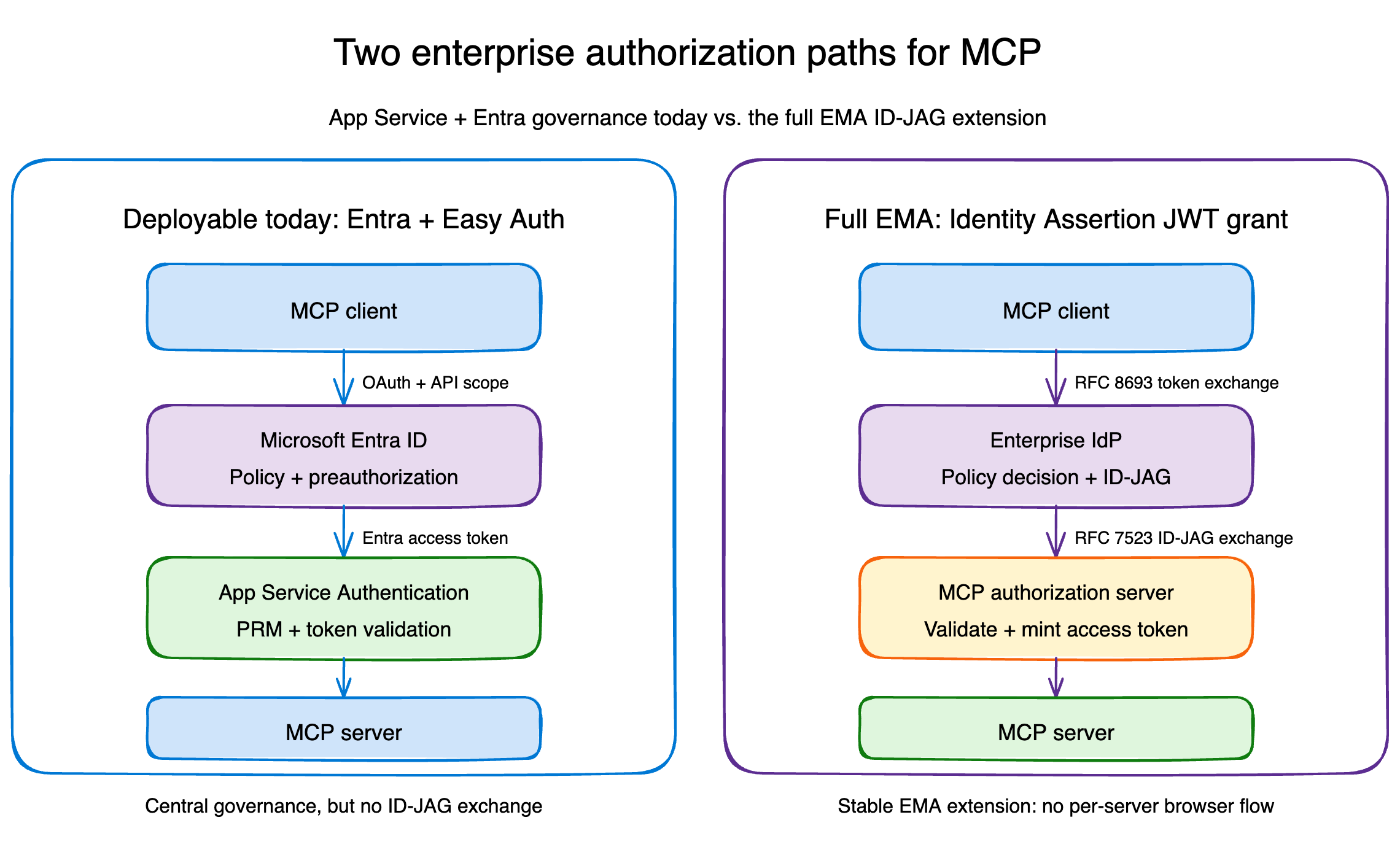
The user never goes through a second browser flow at the MCP authorization server. The enterprise IdP already made the decision.
That gives the organization three useful properties:
- Authorize once, inherit everywhere. Admins enable approved servers and users receive access according to their existing groups and roles.
- Central policy and revocation. Conditional access, employment state, device requirements, and other policy remain in the IdP.
- A cleaner identity boundary. The enterprise login is the source of authority instead of an account picker at every MCP server.
What Entra and App Service provide today
Azure App Service already has a very good home for an enterprise MCP resource server: App Service Authentication sits in front of the application and validates Microsoft Entra access tokens before a request reaches your Python process. App Service Authentication’s MCP authorization integration and protected resource metadata support are currently in preview.
In the deployable half of the sample, App Service:
- publishes OAuth protected resource metadata for MCP discovery;
- requires authentication on
/mcpand returns401to unauthenticated requests; - validates token signature, issuer, audience, and lifetime;
- allows only the configured client application IDs;
- injects the validated principal into platform-controlled request headers;
- leaves only
/and/healthpublic; - sends OpenTelemetry data to Application Insights with managed identity.
The Entra application exposes user_impersonation and preauthorizes Visual Studio Code and Azure CLI. Tenant administrators can then apply Conditional Access to the enterprise application and inspect Entra sign-in logs.
That is centrally governed OAuth. It removes consent prompts for known clients and puts token validation at the platform edge.
It is not native EMA because this path does not ask Entra to issue an ID-JAG through RFC 8693, and there is no RFC 7523 assertion exchange at a separate MCP authorization server.
Here is the practical comparison:
| Capability | Entra + App Service path | EMA path |
|---|---|---|
| Central tenant policy | Yes | Yes |
| Protected resource metadata | Yes | Yes |
| Known-client preauthorization | Yes, through Entra preauthorization | Often still required at the IdP and authorization server |
| Per-server browser flow | Avoided for preauthorized clients | Avoided by protocol design |
| Enterprise IdP issues an ID-JAG | No | Yes |
| MCP authorization server exchanges the ID-JAG | No | Yes |
| Included in the sample | Deployable Azure app | Local interoperability lab |
The distinction matters because "no consent prompt" describes a user experience, not a protocol proof.
Could you run full EMA on App Service today?
Yes. App Service does not prevent you from deploying the complete EMA flow. If your enterprise IdP can issue ID-JAGs, you can implement the resource authorization server and MCP token validation in application code—or point the MCP server at a separate authorization service. App Service then remains the compute platform rather than the authorization boundary.
That approach replaces Easy Auth’s platform-managed token validation with responsibilities such as token issuance, signing-key management, ID-JAG validation, replay protection, scope enforcement, and audit logging. The remaining prerequisite is still an enterprise IdP and MCP client that support the ID-JAG exchange.
I built both paths on purpose
The companion repository is seligj95/app-service-ema-mcp.
The Azure path is a FastAPI MCP server running on Linux App Service. It exposes two read-only tools:
whoamireturns the tenant, client, subject, roles, and scopes that App Service Authentication validated.authorization_modelstates exactly which authorization model protects the deployment.
The local path runs four components in one process:
- a stand-in enterprise IdP;
- an MCP authorization server;
- an MCP resource server;
- an MCP client using the official Python SDK's identity-assertion APIs.
The SDK's IdentityAssertionOAuthProvider covers the second leg: the RFC 7523 JWT bearer grant from the MCP client to the MCP authorization server. The first leg, the RFC 8693 exchange with the enterprise IdP that produces the ID-JAG, is deployment-specific and supplied through the SDK's assertion_provider callback. The lab fulfills that callback with its in-process stand-in IdP.
The lab validates the ID-JAG signature, typ, issuer, audience, client ID, resource, scopes, expiration, and single-use jti. It also tests rejection cases for the wrong issuer, wrong audience, wrong resource, scope escalation, expiration, and replay. The lab deliberately requires a resource claim, which is stricter than the stable specification's optional claim; production authorization servers should choose that posture explicitly.
The stand-in IdP and in-memory token store are deliberately not production components. They make the protocol visible and testable without pretending Entra currently exposes the exact issuance flow used by the lab.
Run the EMA flow locally
Clone the repository and install the project:
git clone https://github.com/seligj95/app-service-ema-mcp
cd app-service-ema-mcp
python3 -m venv .venv
source .venv/bin/activate
python -m pip install -e ".[dev]"
Then run the complete ID-JAG exchange:
python -m examples.ema_lab.client
The final result is the identity and authorization context returned by the MCP server:
{'subject': 'alice@example.com', 'client_id': 'finance-agent',
 'scopes': ['mcp:whoami'], 'resource': 'http://localhost/mcp'}
Run the test suite to see both the successful exchange and the rejection boundaries:
python -m ruff check .
python -m pytest
One implementation note: at the time of writing, PyPI mcp 1.28.1 package does not yet contain the identity-assertion APIs used by the stable extension. The sample pins an exact commit from the official Python SDK until those APIs ship in a release.
Deploy the Entra-governed MCP server
The repository includes azd and Bicep for a Basic B1 Linux App Service plan, Python 3.14, App Service Authentication, protected resource metadata, Log Analytics, Application Insights, and managed-identity telemetry.
After choosing a subscription:
azd auth login
azd env new ema-mcp
azd env set AZURE_SUBSCRIPTION_ID <subscription-id>
azd env set AZURE_LOCATION eastus
./scripts/configure-entra-app.sh
azd up
The Entra bootstrap runs once before azd up because azd resolves required Bicep parameters before the preprovision hook. After that, the hook reruns the same idempotent configuration on each provision.
Verify the deployed boundary:
./scripts/verify-deployment.sh
The script checks that protected resource metadata is available, an anonymous MCP request is rejected, Azure CLI can obtain the delegated API token, and the same MCP request succeeds with that token.
During deployment validation, I invoked whoami against the deployed app. App Service returned the expected Azure CLI client and the delegated scope:
{
  "authentication_type": "aad",
  "client_id": "04b07795-8ddb-461a-bbee-02f9e1bf7b46",
  "scopes": ["user_impersonation"]
}
The corresponding custom trace arrived in Application Insights through the App Service managed identity, with local telemetry authentication disabled.
The response above is shortened for readability. The complete tool result also includes name, subject, tenant_id, and roles.
Three details worth carrying into production
The platform did the hard security work, but three integration details were easy to miss.
1. Allow the audience Entra actually emits
The client requests api://<application-id>/user_impersonation, but a v2 delegated access token can carry the bare application client ID in aud. The sample allows both the bare client ID and the api:// form while still rejecting tokens for every other resource.
2. Keep the SDK's DNS-rebinding protection
The MCP Python SDK defaults to localhost when a server does not declare its deployment hostname. That is a safe local default, but a deployed request correctly fails with 421 Invalid Host header.
The sample reads WEBSITE_HOSTNAME and allowlists only that exact App Service hostname and its optional port form. It does not disable the protection.
3. Account for App Service claim mapping
App Service maps some JWT claim names before it builds X-MS-CLIENT-PRINCIPAL. For example, the delegated scp value can arrive under the mapped scope claim URI.
The application accepts both representations, while continuing to trust only the principal header injected by App Service. A caller-supplied identity header never becomes proof of authentication because the platform strips and replaces these headers at the edge.
The production checklist
This sample gives you the authorization boundary, not every production control. Before using the pattern for a real tool surface:
- Apply Conditional Access deliberately, starting in report-only mode.
- Add tool-level scope or role checks when different tools have different sensitivity.
- Use managed identity or an explicit on-behalf-of flow for downstream APIs; never forward the MCP resource token.
- Add private networking or an API gateway when the workload requires network isolation.
- Keep access tokens and ID-JAGs short-lived.
- Validate ID-JAG signatures with the enterprise IdP's published JWKS, discovered from its authorization server metadata. The lab's shared HMAC key exists only to keep the local flow self-contained.
- Enforce single-use ID-JAG replay protection at the authorization server.
- Log authorization decisions without logging bearer tokens or assertion contents.
- Replace the SDK Git pin after the identity-assertion APIs reach a tested package release.
The takeaway
EMA is bigger than eliminating another consent screen. It defines how an enterprise IdP becomes the authorization control plane for an MCP fleet, with a portable assertion that an MCP authorization server can validate.
Entra ID and App Service already give you many of the outcomes enterprises need: tenant policy, known-client governance, protected resource discovery, platform token validation, Conditional Access, and centralized telemetry.
Just name the boundary honestly.
Use App Service and Easy Auth when you want a deployable, Entra-governed MCP endpoint today. If your IdP already supports ID-JAG issuance, App Service can also host a custom EMA authorization implementation. Otherwise, use the local lab to understand and test the protocol while platform-native support develops.
That is the part I like most about the extension: enterprise authorization stops being an experience every MCP server invents and becomes a protocol the ecosystem can share.